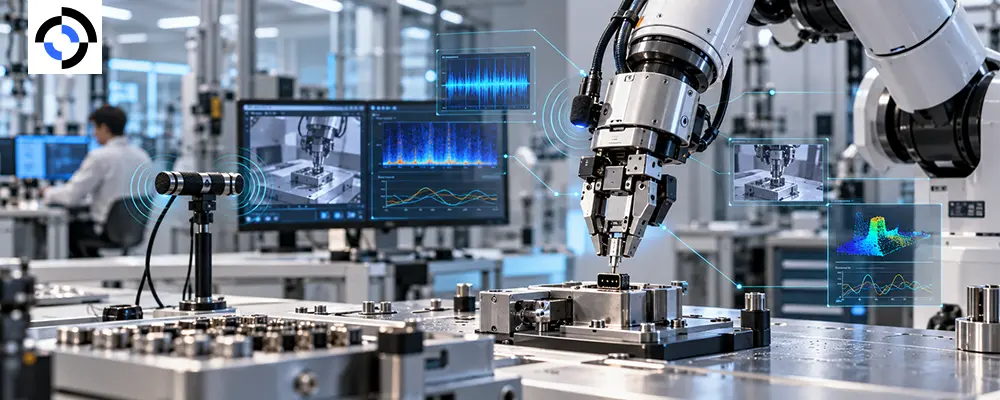
A robot pushes a connector into a socket. The camera sees a gripper and a socket. It does not see the connector seat. The click that confirms success, or the scrape that signals misalignment, never reaches a vision-only dataset.
Audio data for robotics is a small addition to a multimodal robot dataset that can carry outsized information about contact, slip and failure. This guide covers what sound adds, where to put microphones, how to log acoustic sensing data, and when to leave it out.
What sound sees that cameras miss
Contact-rich manipulation is where audio earns its place. In ManiWAV, presented at CoRL 2024, researchers built a handheld device that records synchronous audio and visual feedback during human demonstrations, then trained manipulation policies directly from that data. Their premise is plain: audio helps most when “visual information alone is ambiguous or incomplete.” The system handled four contact-rich tasks and generalized to unseen, real-world environments.
The broader point is about sensor fusion data. Each modality answers a different question, and sound is the cheapest way to add a high-frequency view of contact to a dataset that already holds vision, proprioception and force. Audio does not replace those streams. It fills the gaps between them.
| Event | What audio can carry | Where vision or force falls short |
| Connector or fastener seating | A click or snap | Gripper occludes the contact point |
| Slip | Scrape or friction noise | Motion is small relative to frame interval |
| Collision or drop | An impact transient | Often outside the camera view |
| Pouring or filling | Changing pitch | Opaque containers hide the level |
| Motor strain | A tonal shift | Invisible from outside |
Sound-based failure detection
Sound-based failure detection is where audio often pays back fastest. A dropped part, a jammed gear or a cross-threaded fastener can announce itself acoustically before any visual change. Logged with success and failure labels, those events help train policies to recognize a bad attempt early, and help evaluation pipelines flag episodes that looked fine on video but were not.
Where to put microphones
Placement decides what you hear:
- Contact microphone on the gripper or tool. Picks up vibration carried through the structure. Strong for contact and slip, but it also hears the robot’s own motors.
- Airborne microphone on the wrist. Close to the action; captures impacts and environmental sound.
- Microphone array on the body or head. Suited to speech commands and sound localization; less sensitive to fine contact.
Record the robot’s own motor and fan noise as a separate reference, and capture in the environments where the robot will work, because background noise differs between a lab and a warehouse. ManiWAV addressed the same gap by augmenting training audio with background and robot-motor noise.
How to log audio for sensor fusion
Record raw, lossless audio (WAV or FLAC) at 44.1 kHz or higher. Compressing early discards the high-frequency detail that contact events carry. Keep microphone type, position, gain and sample rate in episode metadata. Annotate discrete acoustic events, such as contact, slip onset, seated and drop, rather than every frame, and tie each to the action and task state.
Most important, put audio on the same time base as everything else. An acoustic event misaligned by tens of milliseconds teaches the model the wrong cause. Our guide to multimodal sensor synchronization covers how.
The trap: collecting audio by default
Audio is not free. It adds storage, annotation effort and, when speech is captured, privacy and consent obligations. Microphones recording everywhere “just in case” yield hours of fan noise and little signal. Start with tasks that have an acoustic signature, pilot on a few hundred episodes, and check whether a model with audio beats one without before scaling. Our earlier post on when sound matters in training sets makes the same case.
A microphone-data checklist
- Pick the right tasks. Choose tasks with a clear acoustic signature.
- Match the microphone to the event. Contact for vibration, airborne for impacts and speech.
- Record losslessly, plus a motor-noise reference.
- Synchronize audio to the shared time base and measure its latency.
- Label discrete events and failures, not every frame.
- Settle consent for speech and background voices before recording.
How Roborax approaches it
Roborax builds audio into multimodal capture the same way it builds in vision, depth and force: planned, synchronized and quality-checked. Our multimodal sensor capture service supports audio alongside RGB-D, tactile, force/torque, IMU and LiDAR streams, backed by our operator consent process and QA checks for missing frames, drift and timestamp errors.
Frequently asked questions
Q: Is audio worth adding to every robot dataset?
A: No. Add it where the task produces an acoustic signature such as seating, slip, impact or machine strain, and pilot first.
Q: Should I use a contact or an airborne microphone?
A:Contact microphones suit vibration and slip; airborne microphones suit impacts and speech. Many teams pilot both on one task before committing.
Q: Does audio need the same synchronization as video?
A:Yes. Treat it as a first-class stream with the same time base and a measured latency.
Has your task got a sound your data is ignoring? Talk to the Roborax data team about adding audio to your next collection run.
Related reading
External reference