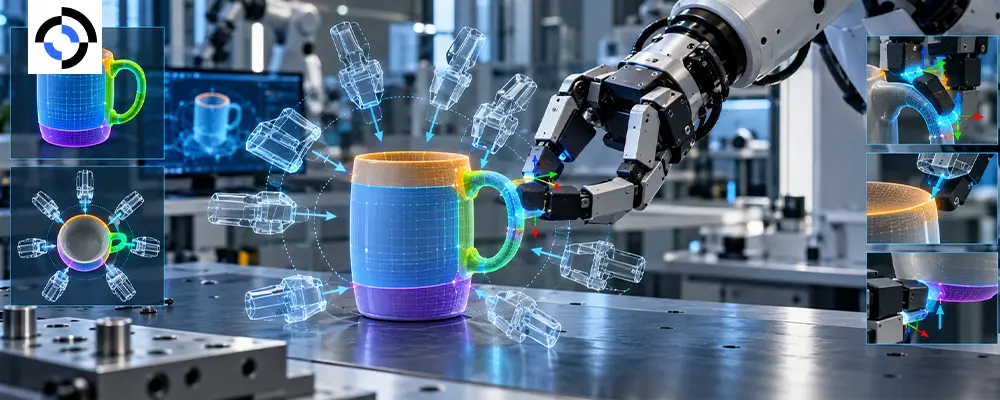
A policy that can see a mug still has to decide where to hold it. Grasp annotation answers that question in data: which part of an object can be grasped, from which direction, with which gripper opening, and where the fingers actually make contact.
This guide covers what belongs in a grasp pose dataset, how affordance labeling and contact point annotation differ, and the checks that keep manipulation data labeling consistent across annotators and gripper types.
What grasp annotation actually captures
A grasp label is more than a point on an object. A complete record usually holds:
- 6-DoF grasp pose: the position and orientation of the gripper at grasp time
- Gripper configuration: opening width for a parallel-jaw gripper, joint angles for a multi-finger hand
- Approach vector: the direction the hand travels in, which decides whether the grasp is reachable
- Contact points and normals: where surfaces touch and the direction of the contact force
- Object part and category: handle, rim, lid, body
- Outcome: lifted, slipped or dropped
Grasp poses, contact points and affordances compared
| Label | Question it answers | Granularity | Typical source |
| Grasp pose | How is the gripper placed? | Per grasp | Demonstration logs, replay, annotators |
| Contact point | Where do surfaces touch? | Per fingertip or pad | Tactile and force data, 3D annotation |
| Affordance | What can be done with this part? | Per object region | Part segmentation, language labels |
The psychologist James Gibson defined affordances as “what it offers the animal, what it provides or furnishes.” In robotics that becomes a label on a region: this handle affords pulling, this rim affords pinching, this lid affords lifting.
Where grasp labels come from
There are three sources, and each has a trap.
- Demonstration-derived grasps. Extract the grasp pose from the frame where the gripper closes. This is cheap and realistic, but you inherit operator habits and only see grasps someone attempted. Our guide to hand-object interaction data covers the capture side.
- Annotator-placed grasps. Annotators position a gripper model on a 3D scan or point cloud. This covers grasps nobody tried, but quality depends on how well annotators understand the specific gripper’s geometry.
- Simulation-generated grasps. Sample thousands of candidates and filter them with an analytic grasp quality metric such as force closure, the approach behind Dex-Net. It scales well, but simulated friction and compliance rarely match the real world.
The strongest datasets combine all three: real successes as the anchor, annotated and simulated grasps for coverage.
Rules that keep grasp labels consistent
- Fix the coordinate frames. Declare gripper-centric versus object-centric frames and where the grasp origin sits, whether fingertip midpoint, palm or flange. Mixed conventions are the most common reason a grasp pose dataset cannot be pooled.
- Label per gripper. A grasp valid for a two-finger gripper is not valid for a five-finger hand. Tag the embodiment or the data cannot transfer.
- Separate feasible from successful. Record whether a grasp is geometrically plausible and whether it actually held under load.
- Use a controlled part vocabulary. “Handle,” “rim,” “body” and “spout” should map to a fixed ontology so affordance labeling agrees across objects.
- Annotate negatives. Failed and unstable grasps teach a model where not to grasp.
Quality checks that catch bad grasps
Review labels in 3D, not just in the image. A grasp that looks right from one camera can collide with the object from another angle. Automated checks catch much of this: penetration between gripper mesh and object, approach vectors blocked by the table, and contact points that sit off the surface.
Human reviewers then handle the ambiguous cases, such as thin objects, deformables and transparent items. Measure agreement on pose error and on part labels, a topic we cover in our guide to inter-annotator agreement for robot data.
At Roborax, grasp and contact labeling sits alongside multimodal sensor capture, so tactile and force channels can validate what annotators draw. For dexterous hands, see our notes on tactile sensing data.
Frequently asked questions
Q: How many grasps per object do we need?
A: There is no fixed number. Cover each distinct object part and approach direction rather than chasing volume, then check whether adding grasps still improves held-out success. Diversity across object instances usually beats depth on a single object.
Q: Can affordance labels transfer between grippers?
A: Region-level affordances often do, because a handle affords pulling regardless of the hand. Grasp poses and contact points do not transfer, since they depend on gripper geometry.
Q: Do we need tactile data for contact point annotation?
A: Not strictly. Annotators can place contacts on 3D geometry. Tactile and force data confirm which contacts were real and make the labels far more trustworthy.
Grasp labels are only as reusable as the conventions behind them. If you are building a grasp pose dataset or auditing an existing one, tell us what you are training and we will scope a labeled pilot on your objects and your gripper.
Related reading
External reference